Animal Rescue Incidents Analysis

In this project, we analyse a dataset from The London Fire Brigade to see how many animals they rescued, what the distribution by animal type looks like, and similarly how cost of rescue varies.
First, load the packages needed.
library(tidyverse)  # Load ggplot2, dplyr, and all the other tidyverse packages
library(gapminder)  # gapminder dataset
library(here)
library(janitor)
library(skimr)
The London Fire Brigade attends a range of non-fire incidents (which we call ‘special services’). These ‘special services’ include assistance to animals that may be trapped or in distress. The data is provided from January 2009 and is updated monthly. A range of information is supplied for each incident including some location information (postcode, borough, ward), as well as the data/time of the incidents. We do not routinely record data about animal deaths or injuries.
Please note that any cost included is a notional cost calculated based on the length of time rounded up to the nearest hour spent by Pump, Aerial and FRU appliances at the incident and charged at the current Brigade hourly rate.
url <- "https://data.london.gov.uk/download/animal-rescue-incidents-attended-by-lfb/8a7d91c2-9aec-4bde-937a-3998f4717cd8/Animal%20Rescue%20incidents%20attended%20by%20LFB%20from%20Jan%202009.csv"

animal_rescue <- read_csv(url,
                          locale = locale(encoding = "CP1252")) %>%
  janitor::clean_names()


glimpse(animal_rescue)
## Rows: 7,873
## Columns: 31
## $ incident_number <chr> "139091", "275091", "2075091", "2872091"~
## $ date_time_of_call <chr> "01/01/2009 03:01", "01/01/2009 08:51", ~
## $ cal_year <dbl> 2009, 2009, 2009, 2009, 2009, 2009, 2009~
## $ fin_year <chr> "2008/09", "2008/09", "2008/09", "2008/0~
## $ type_of_incident <chr> "Special Service", "Special Service", "S~
## $ pump_count <chr> "1", "1", "1", "1", "1", "1", "1", "1", ~
## $ pump_hours_total <chr> "2", "1", "1", "1", "1", "1", "1", "1", ~
## $ hourly_notional_cost <dbl> 255, 255, 255, 255, 255, 255, 255, 255, ~
## $ incident_notional_cost <chr> "510", "255", "255", "255", "255", "255"~
## $ final_description <chr> "Redacted", "Redacted", "Redacted", "Red~
## $ animal_group_parent <chr> "Dog", "Fox", "Dog", "Horse", "Rabbit", ~
## $ originof_call <chr> "Person (land line)", "Person (land line~
## $ property_type <chr> "House - single occupancy", "Railings", ~
## $ property_category <chr> "Dwelling", "Outdoor Structure", "Outdoo~
## $ special_service_type_category <chr> "Other animal assistance", "Other animal~
## $ special_service_type <chr> "Animal assistance involving livestock -~
## $ ward_code <chr> "E05011467", "E05000169", "E05000558", "~
## $ ward <chr> "Crystal Palace & Upper Norwood", "Woods~
## $ borough_code <chr> "E09000008", "E09000008", "E09000029", "~
## $ borough <chr> "Croydon", "Croydon", "Sutton", "Hilling~
## $ stn_ground_name <chr> "Norbury", "Woodside", "Wallington", "Ru~
## $ uprn <chr> "NULL", "NULL", "NULL", "100021491149.00~
## $ street <chr> "Waddington Way", "Grasmere Road", "Mill~
## $ usrn <chr> "20500146.00", "NULL", "NULL", "21401484~
## $ postcode_district <chr> "SE19", "SE25", "SM5", "UB9", "RM3", "RM~
## $ easting_m <chr> "NULL", "534785", "528041", "504689", "N~
## $ northing_m <chr> "NULL", "167546", "164923", "190685", "N~
## $ easting_rounded <dbl> 532350, 534750, 528050, 504650, 554650, ~
## $ northing_rounded <dbl> 170050, 167550, 164950, 190650, 192350, ~
## $ latitude <chr> "NULL", "51.39095371", "51.36894086", "5~
## $ longitude <chr> "NULL", "-0.064166887", "-0.161985191", ~One of the more useful things one can do with any data set is quick counts, namely to see how many observations fall within one category. For instance, if we wanted to count the number of incidents by year, we would either use group_by()... summarise() or, simply count()
animal_rescue %>%
  dplyr::group_by(cal_year) %>%
  summarise(count=n())
## # A tibble: 13 x 2
## cal_year count
## <dbl> <int>
## 1 2009 568
## 2 2010 611
## 3 2011 620
## 4 2012 603
## 5 2013 585
## 6 2014 583
## 7 2015 540
## 8 2016 604
## 9 2017 539
## 10 2018 610
## 11 2019 604
## 12 2020 758
## 13 2021 648animal_rescue %>%
count(cal_year, name="count")## # A tibble: 13 x 2
## cal_year count
## <dbl> <int>
## 1 2009 568
## 2 2010 611
## 3 2011 620
## 4 2012 603
## 5 2013 585
## 6 2014 583
## 7 2015 540
## 8 2016 604
## 9 2017 539
## 10 2018 610
## 11 2019 604
## 12 2020 758
## 13 2021 648Let us try to see how many incidents we have by animal group. Again, we can do this either using group_by() and summarise(), or by using count()
animal_rescue %>%
  group_by(animal_group_parent) %>%

  #group_by and summarise will produce a new column with the count in each animal group
  summarise(count = n()) %>%

  # mutate adds a new column; here we calculate the percentage
  mutate(percent = round(100*count/sum(count),2)) %>%

  # arrange() sorts the data by percent. Since the default sorting is min to max and we would like to see it sorted
  # in descending order (max to min), we use arrange(desc())
  arrange(desc(percent))
## # A tibble: 28 x 3
## animal_group_parent count percent
## <chr> <int> <dbl>
## 1 Cat 3783 48.0
## 2 Bird 1631 20.7
## 3 Dog 1230 15.6
## 4 Fox 373 4.74
## 5 Unknown - Domestic Animal Or Pet 201 2.55
## 6 Horse 195 2.48
## 7 Deer 136 1.73
## 8 Unknown - Wild Animal 94 1.19
## 9 Squirrel 68 0.86
## 10 Unknown - Heavy Livestock Animal 50 0.64
## # ... with 18 more rowsanimal_rescue %>%
# count does the same thing as group_by and summarise
# name = "count" will call the column with the counts "count" ( exciting, I know)
# and 'sort=TRUE' will sort them from max to min
count(animal_group_parent, name="count", sort=TRUE) %>%
mutate(percent = round(100*count/sum(count),2))## # A tibble: 28 x 3
## animal_group_parent count percent
## <chr> <int> <dbl>
## 1 Cat 3783 48.0
## 2 Bird 1631 20.7
## 3 Dog 1230 15.6
## 4 Fox 373 4.74
## 5 Unknown - Domestic Animal Or Pet 201 2.55
## 6 Horse 195 2.48
## 7 Deer 136 1.73
## 8 Unknown - Wild Animal 94 1.19
## 9 Squirrel 68 0.86
## 10 Unknown - Heavy Livestock Animal 50 0.64
## # ... with 18 more rowsFinally, let us have a loot at the notional cost for rescuing each of these animals. As the LFB says,
Please note that any cost included is a notional cost calculated based on the length of time rounded up to the nearest hour spent by Pump, Aerial and FRU appliances at the incident and charged at the current Brigade hourly rate.
There is two things we will do:
- Calculate the mean and median
incident_notional_costfor eachanimal_group_parent - Plot a boxplot to get a feel for the distribution of
incident_notional_costbyanimal_group_parent.
Before we go on, however, we need to fix incident_notional_cost as it is stored as a chr, or character, rather than a number.
# what type is variable incident_notional_cost from dataframe `animal_rescue`
typeof(animal_rescue$incident_notional_cost)
## [1] "character"# readr::parse_number() will convert any numerical values stored as characters into numbers
animal_rescue <- animal_rescue %>%
# we use mutate() to use the parse_number() function and overwrite the same variable
mutate(incident_notional_cost = parse_number(incident_notional_cost))
# incident_notional_cost from dataframe `animal_rescue` is now 'double' or numeric
typeof(animal_rescue$incident_notional_cost)## [1] "double"Now that incident_notional_cost is numeric, let us quickly calculate summary statistics for each animal group.
animal_rescue %>%

  # group by animal_group_parent
  group_by(animal_group_parent) %>%

  # filter resulting data, so each group has at least 6 observations
  filter(n()>6) %>%

  # summarise() will collapse all values into 3 values: the mean, median, and count
  # we use na.rm=TRUE to make sure we remove any NAs, or cases where we do not have the incident cos
  summarise(mean_incident_cost = mean (incident_notional_cost, na.rm=TRUE),
            median_incident_cost = median (incident_notional_cost, na.rm=TRUE),
            sd_incident_cost = sd (incident_notional_cost, na.rm=TRUE),
            min_incident_cost = min (incident_notional_cost, na.rm=TRUE),
            max_incident_cost = max (incident_notional_cost, na.rm=TRUE),
            count = n()) %>%

  # sort the resulting data in descending order. You choose whether to sort by count or mean cost.
  arrange(desc(mean_incident_cost))
## # A tibble: 16 x 7
## animal_group_parent mean_incident_co~ median_incident_~ sd_incident_cost
## <chr> <dbl> <dbl> <dbl>
## 1 Horse 740. 596 541.
## 2 Cow 599. 436 451.
## 3 Unknown - Wild Animal 416. 333 322.
## 4 Deer 415. 333 282.
## 5 Unknown - Heavy Livesto~ 374. 260 263.
## 6 Fox 374. 328 205.
## 7 Snake 356. 339 105.
## 8 Dog 347. 298 168.
## 9 Bird 344. 328 134.
## 10 Cat 344. 326 160.
## 11 Unknown - Domestic Anim~ 326. 295 116.
## 12 cat 324. 290 94.1
## 13 Hamster 315. 290 95.0
## 14 Squirrel 314. 326 56.7
## 15 Ferret 309. 333 39.4
## 16 Rabbit 309. 326 32.2
## # ... with 3 more variables: min_incident_cost <dbl>, max_incident_cost <dbl>,
## # count <int>Finally, let us plot a few plots that show the distribution of incident_cost for each animal group.
# base_plot
base_plot <- animal_rescue %>%
  group_by(animal_group_parent) %>%
  filter(n()>6) %>%
  ggplot(aes(x=incident_notional_cost))+
  facet_wrap(~animal_group_parent, scales = "free")+
  theme_bw()

base_plot + geom_histogram()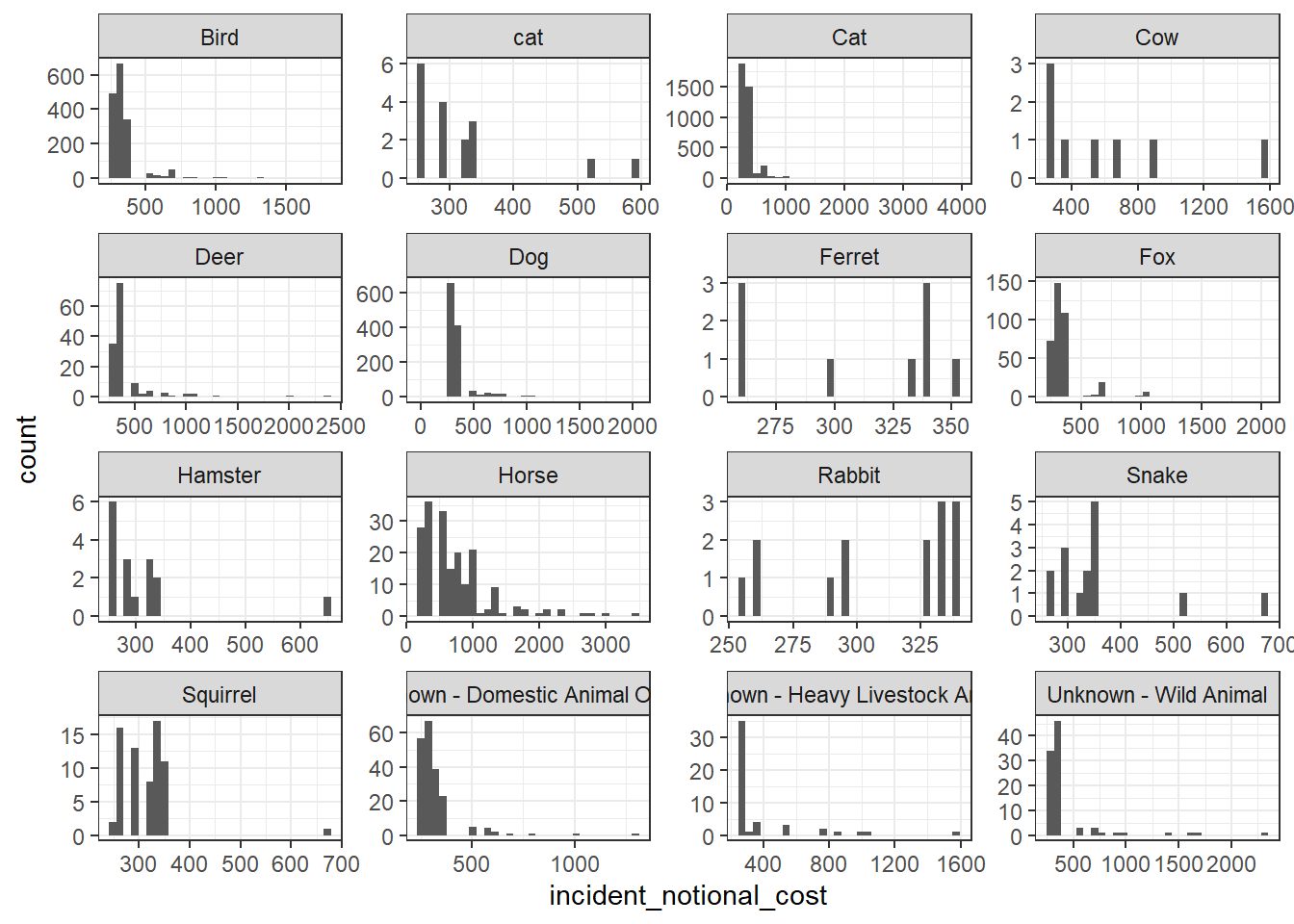
base_plot + geom_density()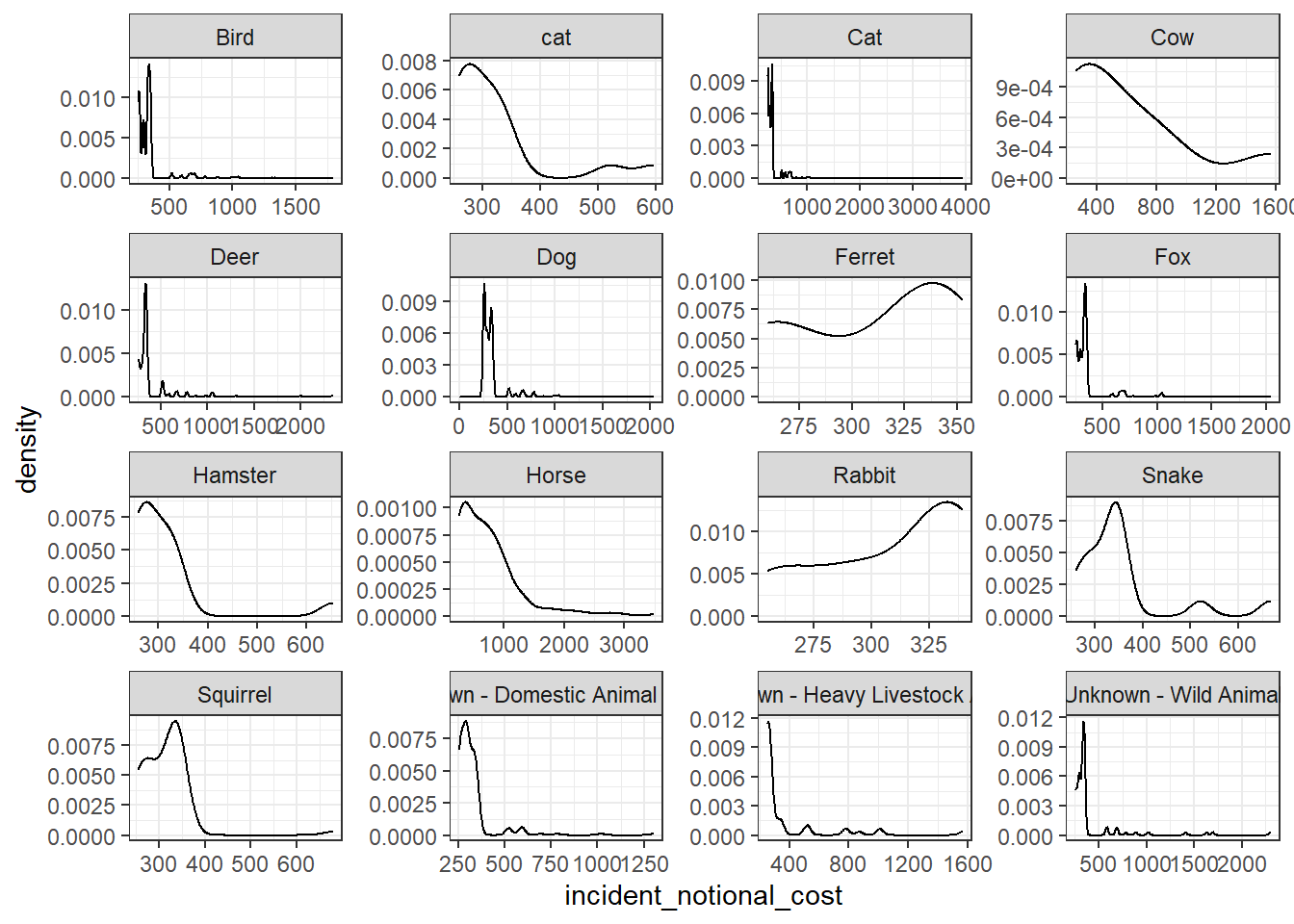
base_plot + geom_boxplot()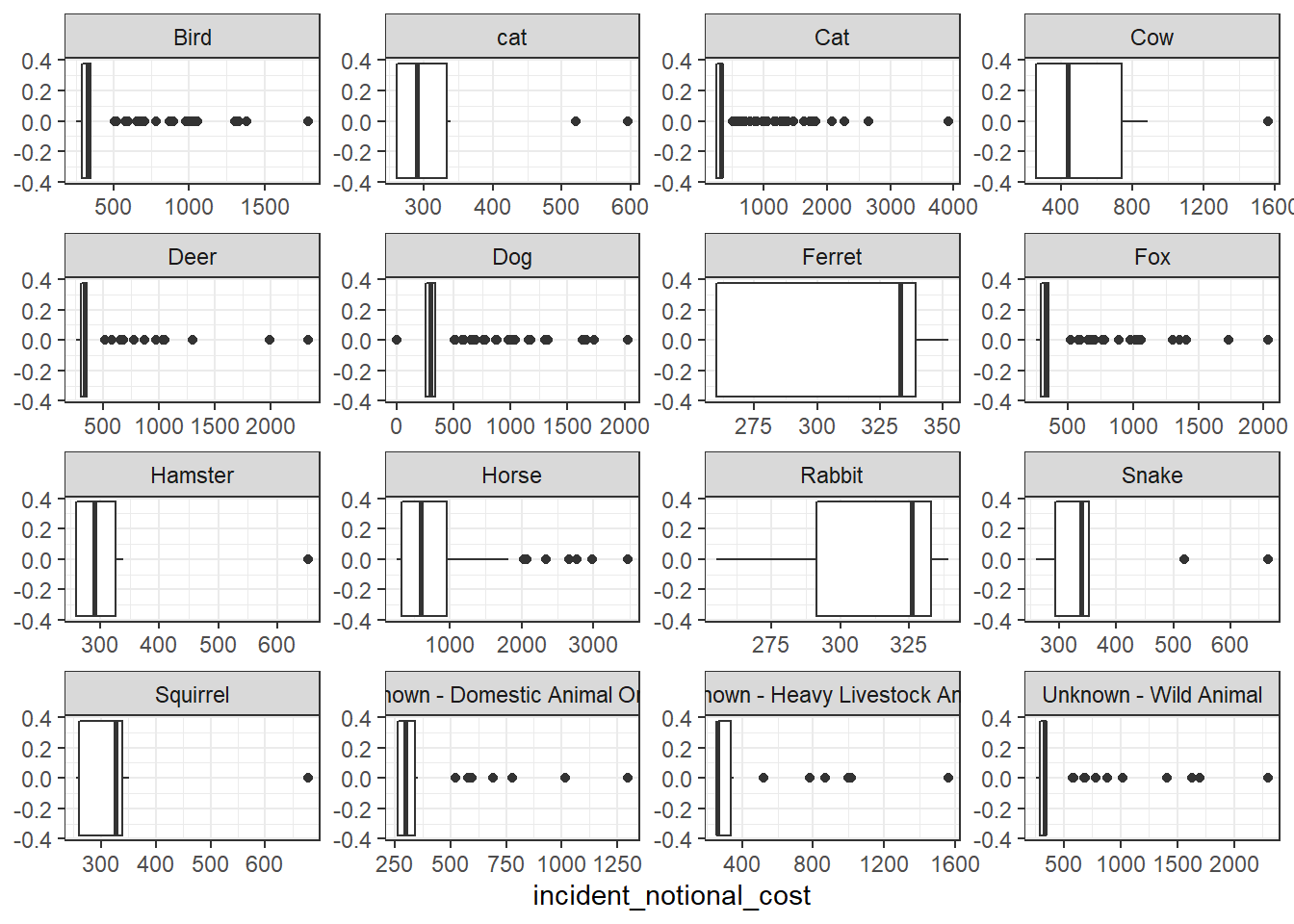
base_plot + stat_ecdf(geom = "step", pad = FALSE) +
  scale_y_continuous(labels = scales::percent)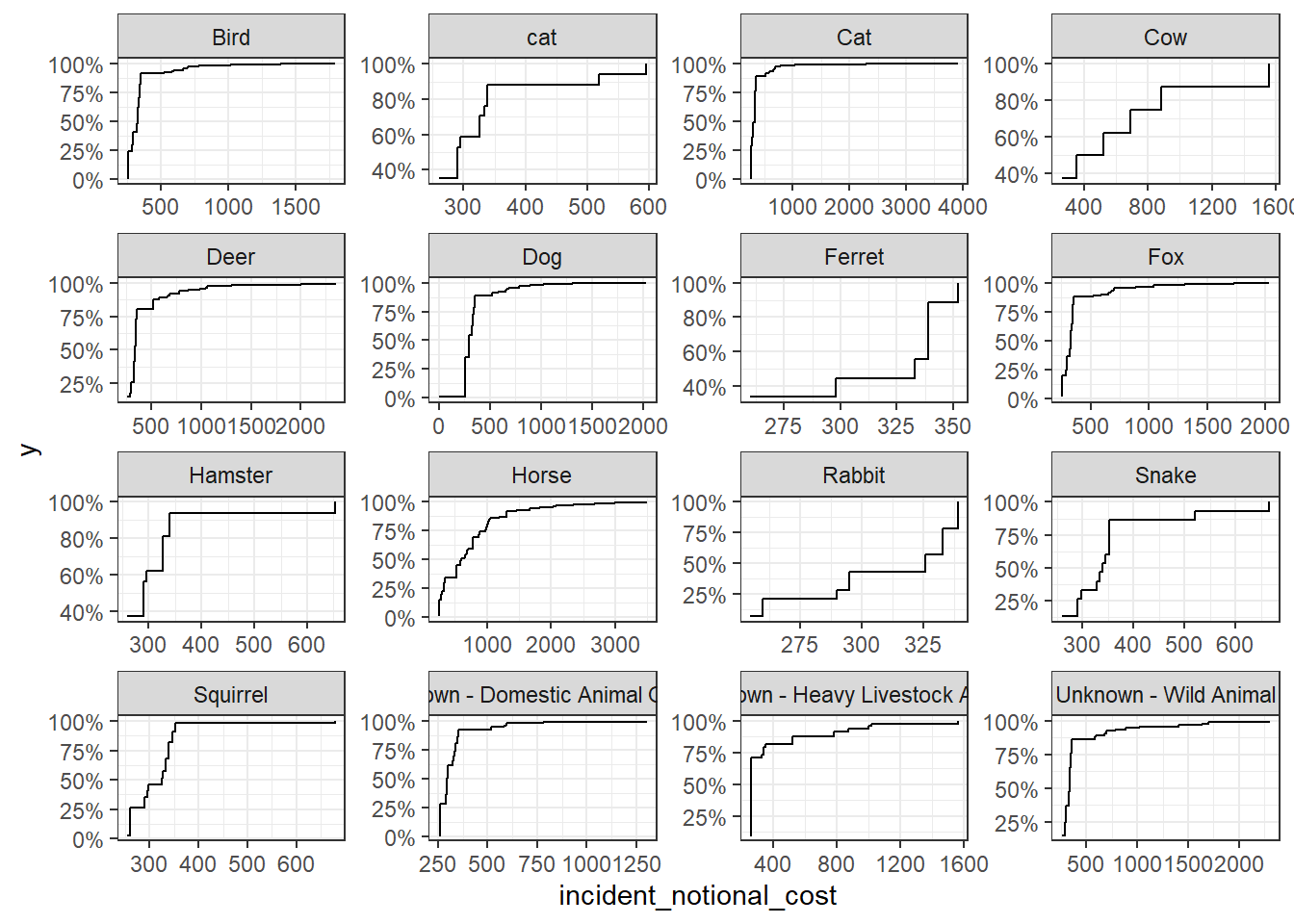
Out of the four graphs, the empirical cumulative density function presents most complete information about the distribution of incident notional cost by animal type. This graph is capable of showing both the distribution of costs in each cost range, just like the histogram, and the critical numbers quadrant figures to represent the distribution, which is the benefit of box plots.
From the graph, we can see that for most common animal categories (all but ferret and rabit), the incident notional cost for most incidents are relatively low and only a smaller portion of incidents have a high cost. This aligns with the previous oberservations: mean is higher than medium because greater portion of the incident cost lie in the lower range. Linking back to real world, this would mean that most animal rescue cases are sorted out relatively easily without using the equipment heavily. However, there are sometimes cases that require either long rescue time or heavy equipment workload to resecue the animals, and these cases pulled the mean cost up.
Furthermore, it can be observed from the graphs that the rescues of larger animals, such as horses and cows, have higher notional costs in general, than smaller animals like cats and dogs. This can be because that larger animals are harder to rescue due to their sizes and weights.